Mobile-first field reporting

Field reports before you leave the driveway.

Capture photos and notes on site, dictate details when typing is slow, then generate polished, branded Reports your clients can understand.

Built for small contractors, solo operators, and field teams.

Sample workflowEvidence to Report

Photo captured

North slope | 10:42 AM

Note dictated

Reviewed before saving

Clearview Exteriors

Roofing & Exterior Services

Sample Report

Client-ready field Report

Storm Damage Walkthrough

Project
Oak Ridge Exterior Inspection
Client / Contact
Jordan Lee
Address
1840 Oak Ridge Drive, Raleigh, NC
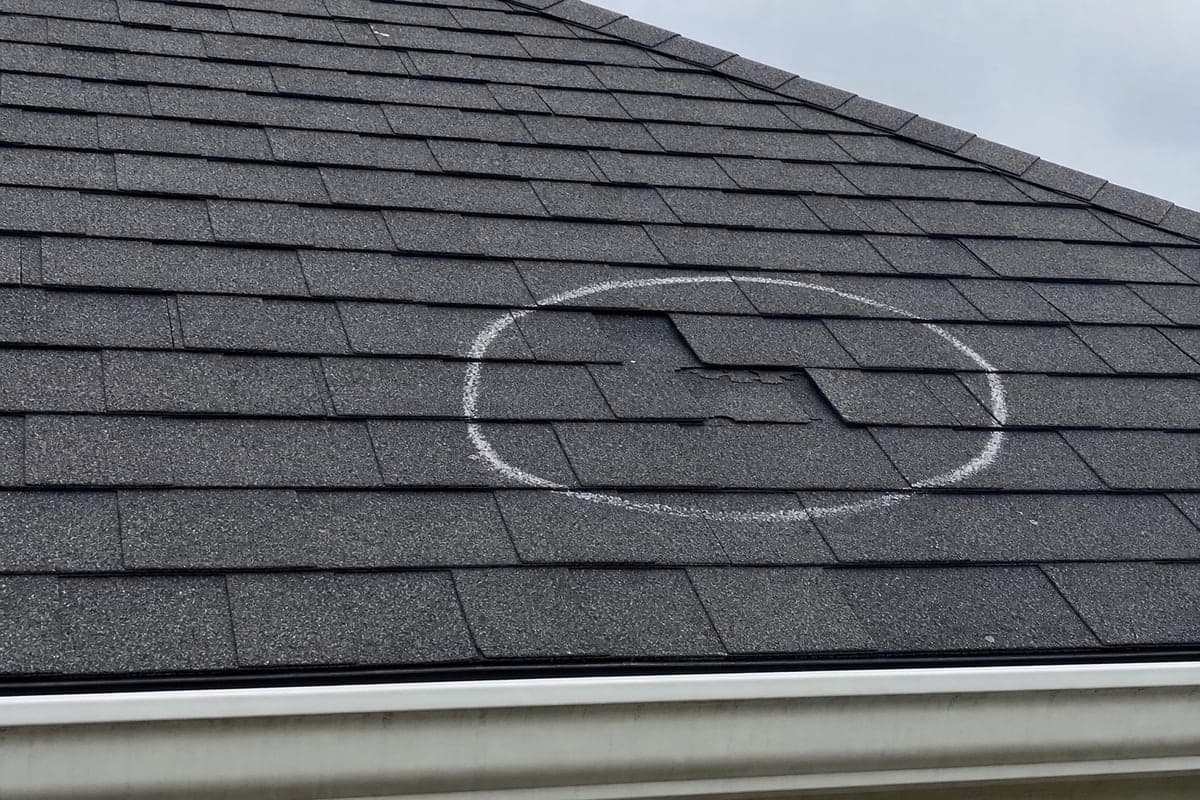
Sample roof Evidence showing a marked area of shingle damage

Evidence photo 01 | North slope impact area with a lifted shingle edge near the gutter line.

Documented observation

Localized shingle damage is visible along the north slope.

Created with CapProofJuly 9, 2026
Sent from CapProof Reports <reports@capproof.com>

What your Client receives

A professional Report built from the field record.

Company identity, Project context, captioned Evidence, observations, and next steps arrive in a format the Client can follow.

Reviewed before delivery

The contractor reviews the client-facing Report before sending it.

Professional sender identity

Replies go to the Company Profile contact email when available.

This fictional sample follows the same structure as CapProof's current saved and visual Reports. It does not promise estimates, pricing, claim decisions, or a public Client portal.

Clearview Exteriors

Roofing & Exterior Services

(919) 555-0148 | office@clearview.example | clearview.example

214 East Franklin Street, Raleigh, NC

Sample Report | Client-ready field Report

Storm Damage Walkthrough

Report date: July 9, 2026

Prepared by: Clearview Exteriors

Project
Oak Ridge Exterior Inspection
Address
1840 Oak Ridge Drive, Raleigh, NC
Client / Contact
Jordan Lee

Report overview

Report summary

Visible storm wear and a drainage concern were documented with supporting photos and clear follow-up steps.

Findings and observations

North slope condition

Localized shingle damage is visible along the north slope. The nearby gutter outlet should be reviewed for blockage.

Recommended next steps

Simple follow-up

  1. 01Review the observations and Evidence in this Report.
  2. 02Discuss the next step with the contractor.
  3. 03Approve any additional scope separately.

Clearview Exteriors | Roofing & Exterior Services

Created with CapProof | capproof.com

This Report documents observations and Project information available at the time it was prepared. It is not a final estimate, engineering report, insurance determination, or legal opinion. Review the documented information and confirm any additional scope separately.

The documentation gap

The work happened. The record is scattered.

Photos stay in a camera roll. Details live in text threads and emails. The verbal walkthrough is remembered differently a week later. Follow-up slows down because the Client never received one clear record of what was found.

01

Camera roll

The right photo is hard to find when a question comes later.

02

Texts and emails

Requests and observations are separated from the Project history.

03

Verbal walkthrough

Important detail depends on memory instead of a saved record.

04

Loose documents

The Client gets pieces of the story instead of one understandable Report.

How it works

Four steps from field condition to saved proof.

  1. 01

    Capture Evidence

    Take Project photos while the condition is still in front of you.

    Photo, Project, date, and field context stay together.

  2. 02

    Add field notes

    Type the details or dictate a note when stopping to type is impractical.

    Review the wording before it becomes part of the record.

  3. 03

    Generate the Report

    Organize selected Evidence into a branded draft built for client review.

    Summary, observations, captions, and next steps stay factual.

  4. 04

    Save and send proof

    Keep the finished Report on the Project timeline and send it to the Client.

    Return to the saved Report without rebuilding the history.

Report saved and sent

Complete

Storm Damage Walkthrough | Project timeline | July 9, 2026

Capture Evidence

Oak Ridge Exterior

1 photo ready

North slope condition | 10:42 AM

Dictated field note

Lifted shingle edge near the gutter outlet. Review drainage before follow-up.

Transcript reviewed before saving

Save Evidence
Evidence saved to the Project timeline

Built for real field conditions

Capture the detail while you can still point to it.

CapProof keeps the field task direct: open the Project, capture Evidence, add the context, and save it before moving on.

One-hand capture

Large primary actions keep the next field task obvious on a phone.

Gloves and poor lighting

High-contrast controls and short capture steps reduce screen hunting.

Roofs, attics, and crawlspaces

Document the condition where it is found instead of reconstructing it later.

Typing is too slow

Dictate a field note, review the transcript, and save it with the Evidence.

The Client needs an update

Move from field notes to a professional Report while the details are current.

Practical use cases

One documentation habit across the field work you already do.

The trade changes. The need stays the same: capture the condition, add context, and give the Client a Report they can understand.

01

Roofing inspections

Document visible roof conditions and explain the follow-up.

02

Storm damage walkthroughs

Organize visible damage and Client concerns without making claim determinations.

03

Painting walkthroughs

Capture surface conditions and scope details before pricing is handled elsewhere.

04

Remodeling scopes

Record existing conditions and the work being discussed.

05

Home inspections

Present property findings with photos and plain-language observations.

06

Property maintenance

Keep recurring conditions and completed visits attached to the property record.

07

Builder punch lists

Pair open items with photos, notes, and clear status context.

08

Real estate walkthroughs

Create an understandable record of property conditions and concerns.

Focused by design

Not another CRM. Not estimating software. Not an invoicing platform.

CapProof stays focused on field Evidence, client-ready Reports, and a saved Project record. Small contractors, solo operators, and field teams get the documentation layer without another bloated business suite.

Capture

Photos and field notes attached to the right Project.

Present

Branded Reports organized for Client review.

Keep

Saved Evidence and Report history for later reference.

Controlled early access

Send a better field record.

For contractors who want better field documentation and more professional client Reports.

Request Access